Google Antigravity Launches MCP Apps Support in Workspace
Google Antigravity has introduced Model Context Protocol (MCP) apps support, enabling developers and users to generate interactive charts, sandboxes, release bo
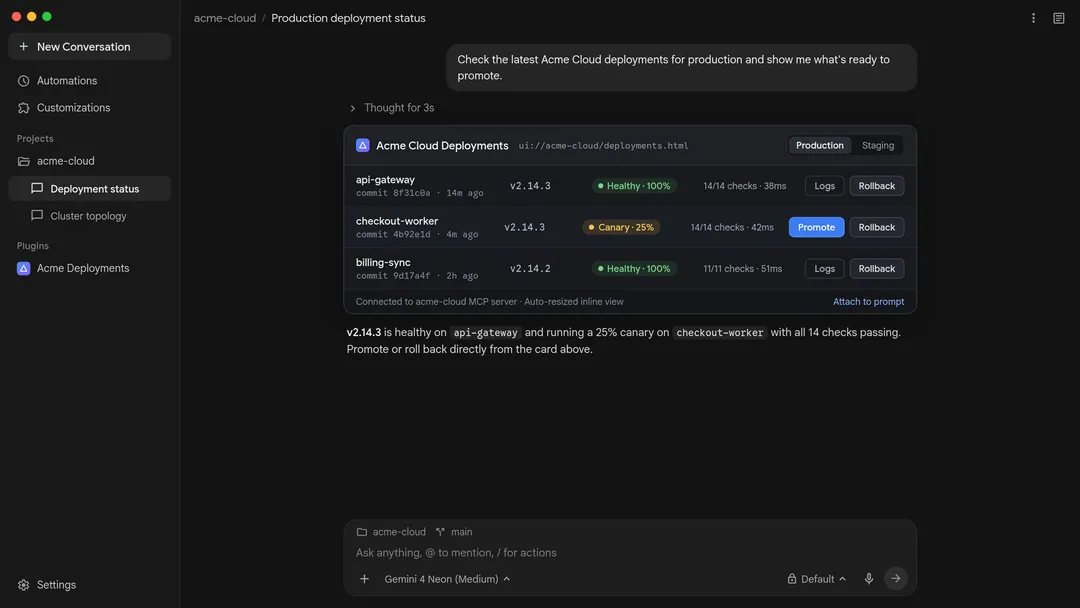
Google has officially rolled out support for Model Context Protocol (MCP) apps within its next-generation AI agent and developer workspace platform, Google Antigravity. This update allows developers and users to generate and interact with a variety of visual tools directly inside their workspace without needing to switch between external applications or browser tabs.
Image source: https://x.com/antigravity/status/2125315892695216483
As artificial intelligence agents play an increasingly central role in software development and data analysis, Antigravity’s adoption of MCP apps marks a significant step forward in bridging the gap between AI models and interactive tooling. Instead of relying solely on static text outputs, the platform now empowers agents to instantiate real-time, user-manipulable interfaces right within the conversation flow.
Model Context Protocol (MCP) and Workspace Transformation
At the heart of this update is the Model Context Protocol (MCP), an open standard protocol designed to help AI models securely and seamlessly interact with external data sources, developer tools, and file systems. While AI models have traditionally depended on text-based prompts and limited function-calling mechanisms, MCP provides a robust foundation for deep integration with diverse external services.
Google Antigravity has deeply embedded this protocol into its core workspace environment. Users can now move beyond basic text summaries and code snippets to dynamically generate interactive charts, execution sandboxes, project release boards, and tailored custom file viewers within their conversational interface.
Key Partner Plugins Ecosystem and Developer Workflows
The launch of MCP apps in Antigravity comes paired with integrations from several prominent developer tools and platforms, demonstrating immediate practical utility across the software development lifecycle—from code review and monitoring to project management and deployment.
- CodeRabbit: The CodeRabbit Antigravity plugin integrates interactive code review directly into the agent workflow, allowing developers to review and secure code right where they write it.
- Datadog: Brings live, interactive Datadog graphs straight into the chat interface. Developers can investigate errors, scrub timelines, inspect spikes, and toggle between timeseries, top lists, pie charts, and tables without switching tabs.
- Monday.com: Enables users to seamlessly view live boards, status widgets, and item updates right within their workspace context.
- Qodo: Streamlines the review process by letting developers transition from an agent's summary to changed files and review findings within the same conversation.
- Vercel: Allows developers to build and deploy to Vercel, check deployment statuses, and open live sandbox desktops to watch their agent work inside the chat.
The Evolution of Agent-Centric Development and Outlook
Google Antigravity's support for MCP apps demonstrates how AI agents are evolving from passive advisors into active execution partners that can perform and visually verify development tasks. Developers no longer need to juggle multiple browser tabs or disparate tools, as complex workflows can now be managed fluidly inside a unified conversational context.
However, as these advanced capabilities roll out, ensuring stable configuration management and granular permission controls across various project environments remains crucial. With the official rollout underway via Google’s announcements, teams are encouraged to review plugin compatibility and adoption timelines according to their specific development workflows.
Sources
- Google Antigravity Official X Announcement: 2026-11-25 MCP Apps Support in Google Antigravity
- Google Antigravity Official Blog: MCP Apps in Antigravity