Get 6 Directions Before Fixing Your Prompt: Exploring with Envato Burst Mode
A practical tip from X creator Alan (@alannnfx): pull multiple image directions from one idea at once with Envato Burst Mode, then pick a winner and keep going.
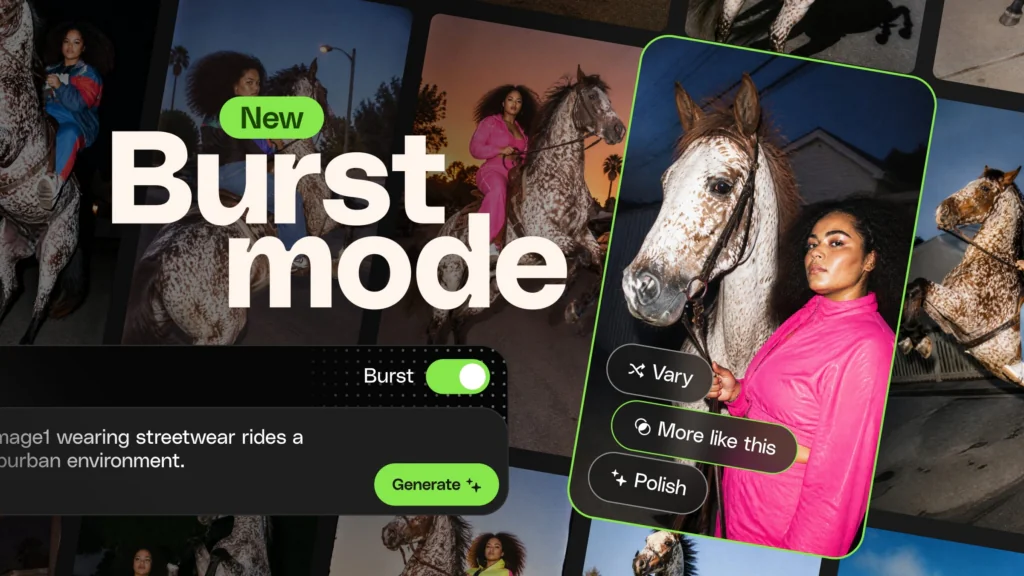
X creator Alan (@alannnfx) shared a practical Envato Burst Mode tip on October 8, 2026. His point: "sometimes you don't need a better prompt, you just need to see a few different ideas first." Burst Mode turns one idea into up to six image directions at once — you pick the one you like and keep going.
Image source: Envato
The original post reads: "sometimes you don't need a better prompt, you just need to see a few different ideas first. Burst Mode by @envato gives you 6 directions from one idea. then you just pick the one you like and keep going."
What Burst Mode Does
Burst Mode is an exploration mode inside Envato's AI image generator. According to Envato's official documentation, you feed it a rough idea and it returns one, three, or six variations in a single batch. Envato states that one batch costs one AI credit.
Envato positions the mode for the earlier creative moment: exploration before perfection. Instead of treating every generation like a decision you must get right the first time, you turn a brief, a reference, or a hunch into up to six comparable image directions. The "up to 10x faster" and "one credit" figures are Envato marketing claims, not independently measured results.
Narrowing Down: Three Steering Levels and Three Follow-Up Actions
The official doc TL;DR describes a simple flow.
- Pick a batch size: one, three, or six variations at once.
- Steer exploration breadth: Focused, Balanced, or Wild.
- Develop the winner: Vary, More like this, or Polish to build on the direction that works.
The order is "generate broadly → compare → pick one and refine." Because you lock the visual direction before wrestling with prompt wording, it can save time on ambiguous briefs where the right answer is unclear.
Before You Start
- You need an Envato account and AI credits. Credit terms may change under Envato policy.
- A single text prompt is enough to start; Envato's official guide also describes reference-image upload workflows in its AI image generator.
- Replies to the post call it credit-saving and very fast, but those are individual user impressions, not verified benchmarks.
Original source
- Alan (@alannnfx) original post: https://x.com/alannnfx/status/2108027980090048929
- Envato official guide "Introducing Burst mode": https://elements.envato.com/learn/burst-mode-creative-exploration
- Envato Burst Mode landing page: https://elements.envato.com/lp/burst-mode