diagram-design: Diagram Generation Skill for Claude Code and Codex
A comprehensive guide to diagram-design, an agent skill generating 42 types of brand-customized diagrams in HTML/SVG from natural language and website URLs.
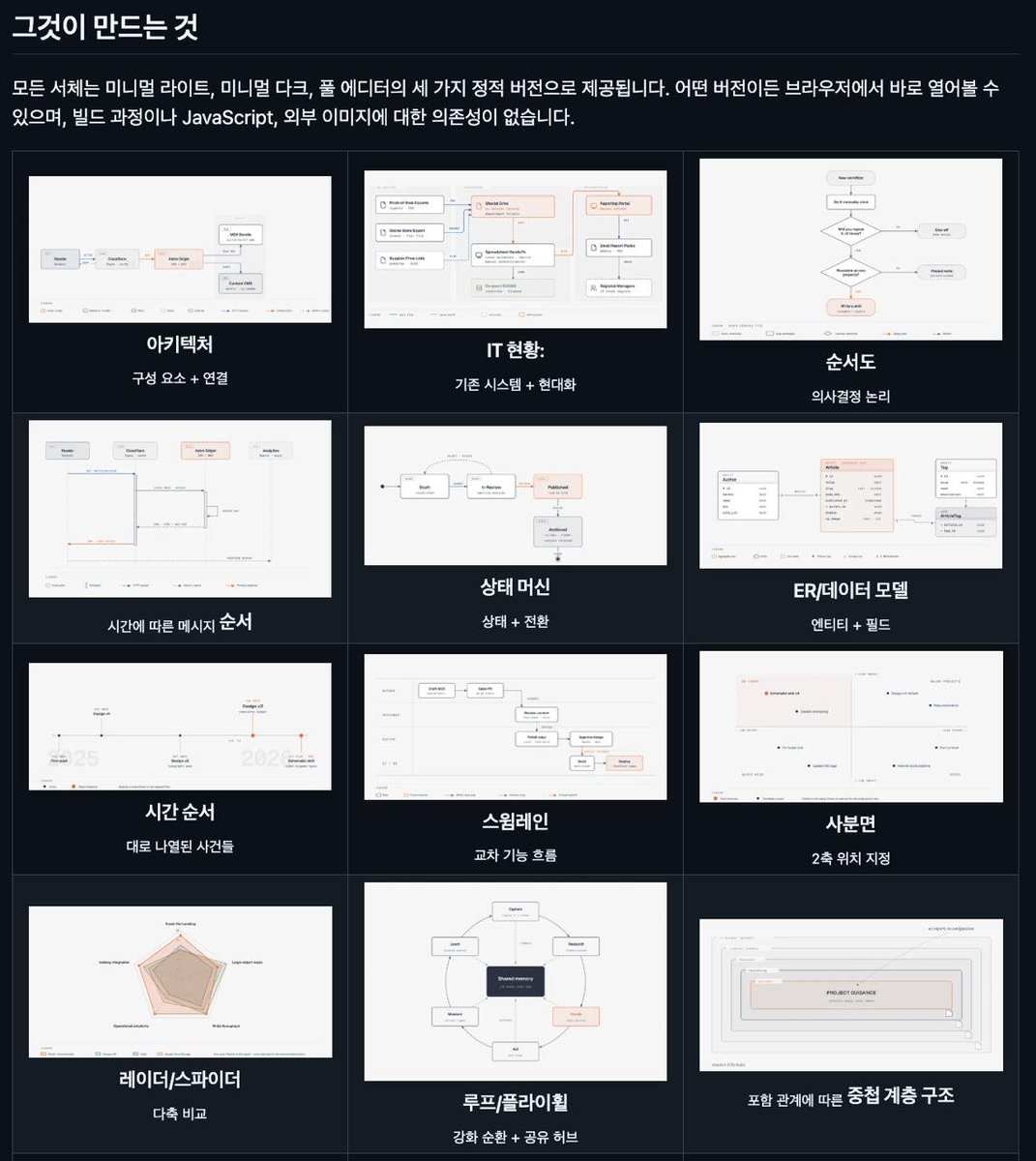
diagram-design, an AI coding agent skill designed to streamline visual diagramming for documentation and presentations, has been released. Created by @cathrynlavery, this skill integrates directly into Claude Code and Codex environments to generate and visualize custom diagrams conversationally.
Image source: AI 카페인 ☕️ (@AI_Caffeine)
42 Diagram Types and Automated Brand Styling
diagram-design supports a comprehensive array of visual formats to help technical writers, designers, and software engineers illustrate complex architectures and logic flows.
- Support for 42 Diagram Categories: Covers system architecture diagrams, flowcharts, timelines, Gantt charts, user journeys, entity-relationship diagrams (ERDs), and more.
- Brand-Customized Styling: Users can provide a target website URL to extract brand color schemes and typography, generating diagrams that align seamlessly with an existing product or design identity.
- Natural Language Layout Assembly: When users describe diagram content in plain language, the agent automatically selects the appropriate diagram structure and arranges elements accordingly.
Redesigning Existing Diagrams and Native HTML/SVG Output
In addition to authoring new diagrams from scratch, diagram-design streamlines workflows for updating legacy visual assets.
- Format Conversion and Restyling: Accepts existing diagram definitions from Mermaid, draw.io, and Excalidraw, restyling them into polished, modern visuals.
- Standard Web Output Formats: Outputs directly to HTML and SVG, enabling immediate browser previews and direct embedding into documentation or slide decks.
- Step-by-Step Animations: Supports both static graphic outputs and sequential step-by-step animations to illustrate operational flows clearly.
Installation and Runtime Environment
diagram-design can be added to compatible agent environments using the Node.js package execution tooling:
npx skills add cathrynlavery/diagram-design
Execution requires an active Claude Code or Codex agent harness along with a Node.js (npx) runtime environment. When working with intricate custom layouts, final diagram composition quality may vary based on prompt specificity and structural detail.
Sources
- AI Caffeine ☕️ (@AI_Caffeine): diagram-design Introduction and Installation Guide
- cathrynlavery / diagram-design GitHub Repository