Configuring MOSS-Image Pose Control Workflows with ComfyUI and Depth LoRA
A practical MOSS-Image pose control workflow shared by Photogenic Weekend. Run the 8-step Depth LoRA at 10 steps with CFG 1.5 to maintain stable poses in ComfyU
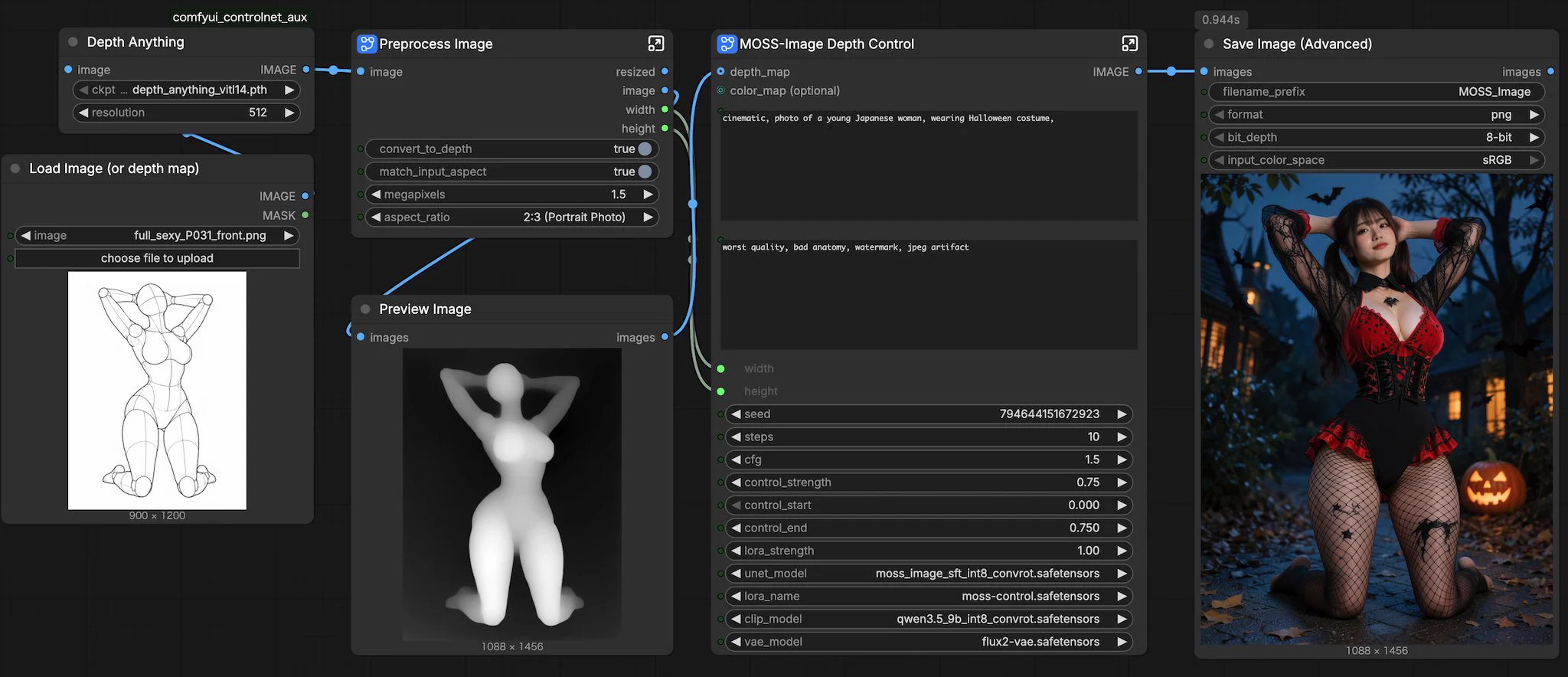
Creator Photogenic Weekend (@PhotogenicWeekE) shared a ComfyUI workflow using Depth LoRA to control MOSS-Image poses.
Image source: @PhotogenicWeekE
Latent encoding with denoise 0.6–0.7 works at times, but depth maps provide much firmer posture control.
ComfyUI Workflow Architecture and Core Resources
- Workflow File: Available on Comfy Workflows for direct import.
- Depth LoRA: Powered by darask0/MOSS-Image-color-depth-control.
- Pose Database: References from ai-pose-gallery.pages.dev serve as pose inputs.
The setup functions smoothly without requiring a Depth Anything node.
Sampling Parameter Optimization: 10 Steps and CFG 1.5
- Step Tuning: Designed for 8 steps, running at 10 steps improves stability.
- CFG 1.5: Keeps generation aligned with the depth map without artifacting.
- Prompt Setup: In Generate Text, enter "pose detail" as System Prompt.
Operational Caveats and Pose Lock Constraints
A strict depth map locks anatomy tightly, limiting changes to hair and body proportions. Swapping short hair for long hair or adjusting physique causes edge conflicts. Creators should limit edits to colors and facial expressions, or use inpainting passes for structural changes.
Original source
- Photogenic Weekend (@PhotogenicWeekE): Original source