Anthropic Releases claude-code-setup: Official Automation Analysis Plugin for Claude Code
A practical guide to Anthropic's official claude-code-setup plugin: scan codebases in read-only mode to recommend tailored Hooks, Skills, MCP servers, and comma
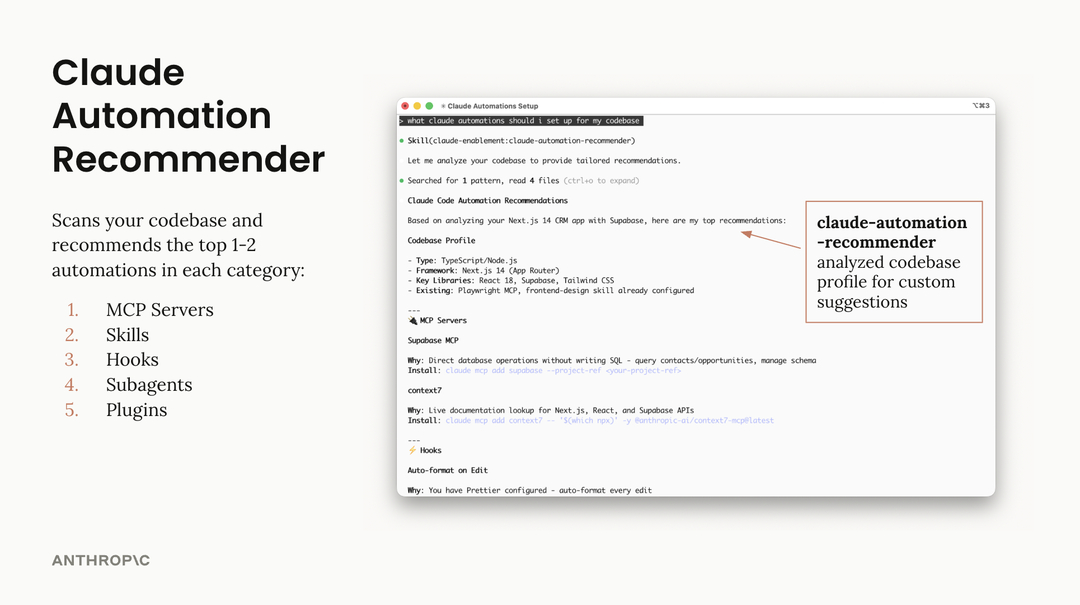
As Anthropic expands its ecosystem for agentic terminal-based coding assistants, it has officially released 'claude-code-setup' through its official plugin registry (claude-plugins-official). The dedicated utility inspects a repository's architecture and tooling environment to recommend practical workflow automations that boost engineering productivity.
Image source: Anthropic claude-plugins-official
Packaged specifically for the open-source Claude Code command-line interface, this newly launched plugin helps developers eliminate the repetitive chore of manually architecting agent configuration files for every distinct codebase. Instead, teams can establish standardized and context-aware agent settings with minimal setup overhead.
Read-Only Repository Scanning with a Single Command
The most prominent engineering design choice behind claude-code-setup is its strictly read-only analysis mechanism, ensuring zero modifications to existing source trees or branch status.
Within the Claude Code CLI environment, installation and activation take just a single command:
/plugin install claude-code-setup@claude-plugins-official
Once installed, users can enter the prompt recommend automations for this project in the conversational session. The plugin systematically scans the directory hierarchy, dependency manifests, build scripts, and development workflows. Because it never writes or mutates files during this inspection, repository integrity remains fully preserved while uncovering high-value automation opportunities.
Tailored Setup Recommendations Across Five Key Categories
Rather than producing generic suggestions, claude-code-setup prioritizes the top one to two recommendations tailored directly to the scanned project across five primary automation categories:
- Hooks: Pinpoints pre-commit linting, test suites, or formatting scripts that can be invoked at specific workflow lifecycle events to ensure code hygiene and guard against common oversights.
- Skills: Outlines domain-specific capabilities, recurring refactoring scripts, or deployment routines codified as reproducible agent skills that teammates can reuse consistently.
- MCP Servers (Model Context Protocol): Identifies external context tools—such as database inspectors, local dev tools, or internal API clients—that augment Claude Code with live workspace insight.
- Subagents: Suggests isolated sub-processes for time-intensive or multi-file operations, such as comprehensive unit test runs or large-scale migrations, preventing clutter in the primary context window.
- Slash Commands: Groups multi-step workflows, staging verifications, or documentation generators into reusable slash shortcuts that engineers can trigger instantly.
By focusing on high-signal recommendations aligned with project dependencies, teams can quickly establish effective agent boundaries without incurring cognitive load.
Ecosystem Integration and Practical Operational Considerations
The claude-code-setup plugin integrates directly with the official Anthropic plugin registry (claude.com/plugins) and the open-source Claude Code ecosystem (GitHub anthropics/claude-code, released under the Apache-2.0 license). This ensures ongoing maintenance, alignment with new agent runtime features, and standardized distribution.
When integrating the tool into production engineering environments, teams should keep two practical operational considerations in mind:
- Manual Review Required for Implementation: As a read-only advisor, the plugin does not generate executable files or apply configuration scripts automatically. Writing proposed Hook scripts, configuring MCP endpoints, and provisioning environment credentials remain the responsibility of the developer after careful review.
- Token Overhead on Monorepos: Scanning extensive repository trees, deep subdirectories, and numerous configuration files across large monorepos will consume additional context tokens and may take longer to complete the initial analysis pass.
By significantly cutting down the research needed to build agent infrastructure, claude-code-setup offers a dependable starting point for any developer looking to unlock the full potential of Claude Code.
Sources
The official plugin specifications, automated analysis rules, and release metadata covered in this article are available through the following official repositories and announcements:
- Anthropic Official Claude Plugins Directory: Anthropic Claude Plugins
- Official Claude Plugins Registry: GitHub anthropics/claude-plugins-official
- Claude Code Setup Plugin Source: GitHub anthropics/claude-plugins-official/plugins/claude-code-setup
- Original Community Announcement: Zyvex (@Zyvex_0x) on X
- Open-Source Claude Code Repository: GitHub anthropics/claude-code