A Prompt Workflow for Generating 3 Domain Motion Explainer Videos and Cheatsheets via Claude Code and Codex
The creator behind a 1-million-impression AI terminology explainer series has released a GitHub template and prompt workflow that pairs with Claude Code and Cod
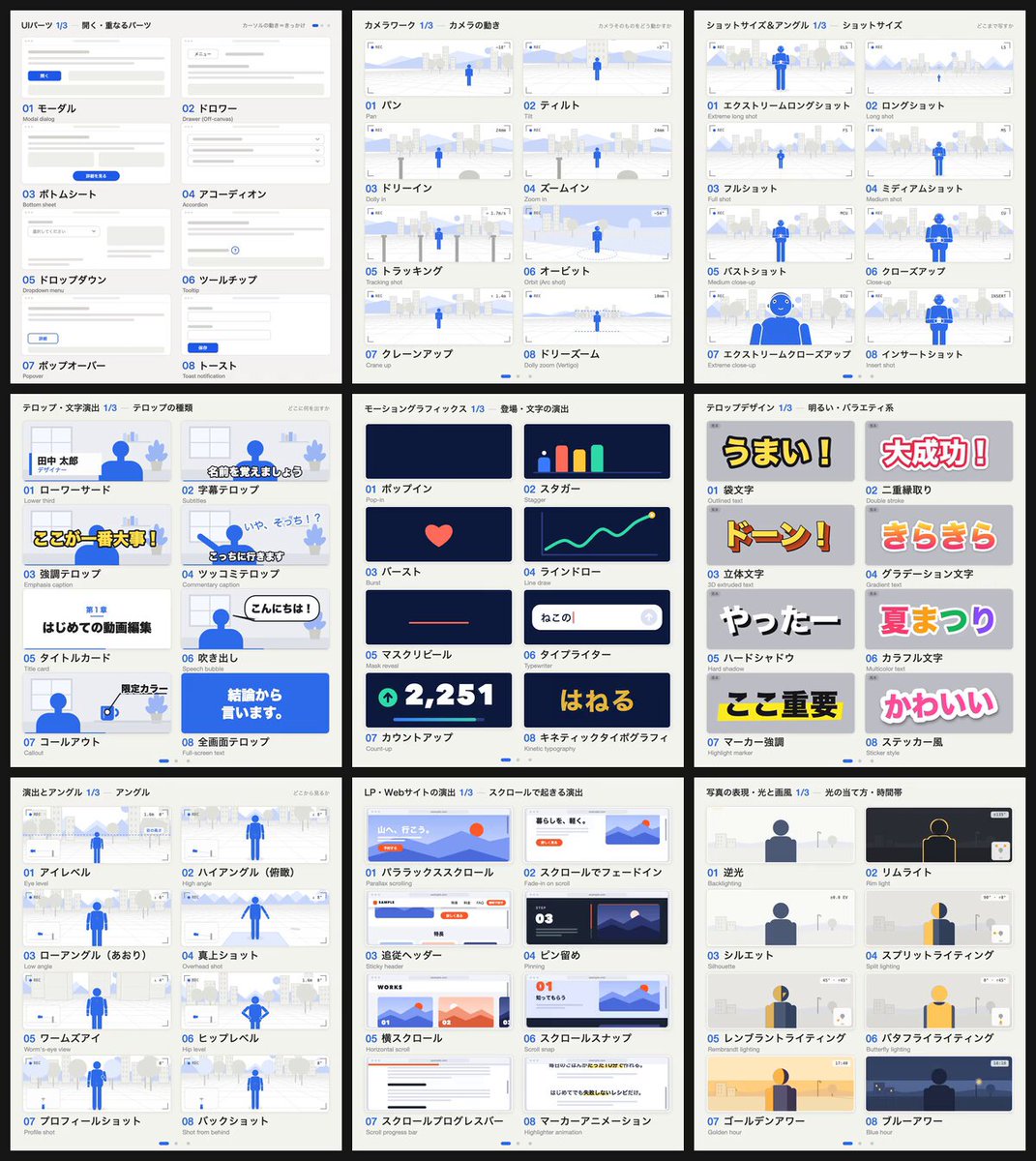
Shohei (@showheyohtaki), representative of Daytra in Japan and a video creator, released his end-to-end production pipeline on GitHub on October 16, 2026. The template codifies the exact workflow behind his viral 'AI Terminology Explainer' video series, which has surpassed 1 million impressions.
Image source: X @showheyohtaki
The newly shared workflow integrates coding agent environments like Claude Code and Codex with an interactive motion asset library. By providing only their specific domain or field of expertise, creators can systematically generate three structured explainer video scripts alongside a companion reference cheatsheet.
Workflow Overview: Generating 3 Explainer Scripts and a Cheatsheet from Domain Input
When building educational explainer videos, creators frequently face two bottlenecks: structuring domain knowledge into digestible visual scenes and crafting precise prompts for AI animation engines.
Shohei's workflow addresses this by having agentic tools like Claude Code or Codex ingest the GitHub repository directly. Once the user specifies their target domain, the workflow automatically generates:
- 3 Domain-Specific Explainer Scripts & Scene Structures: Complete scripts covering topic selection, hook introductions, core explanations, and outro calls-to-action.
- Key Summary Cheatsheets: Reference sheets summarizing core terms and takeaways for viewers to reference in practice.
The 4-Step Production Process and motion-prompt Library Integration
The author outlines a four-step implementation process:
- Reference the Repository: Load the motion-prompt GitHub template into your Claude Code or Codex workspace.
- Retrieve the Library: Prompt the agent with
"Show me the motion-prompt library". - Select Motion Elements: Browse the web-based library (
https://showheyohtaki.github.io/motion-prompt/), which features 120 interactive animation samples across 5 categories (including camera work, UI components, and motion graphics), choose a desired style, and click"Send to AI". - Direct Scene Staging: Instruct the agent with concrete stylistic references, such as
"Frame the intro of this video with this look and motion".
This framework eliminates the guesswork of figuring out technical prompt terminology for specific visual movements. By passing functional code samples directly to the coding agent, creators reduce prompt misinterpretations and iterative trial-and-error.
Production Caveats: Line-by-Line Fact-Checking for Domain Jargon
Field practitioners evaluating the workflow have highlighted crucial operational caveats:
- Risk of Generic Interpretations of Acronyms: When AI agents (Claude Code, Codex) define domain terminology, they risk misinterpreting specialized industry acronyms using broad, generic dictionary definitions. Domain experts must carefully review and verify every generated definition line by line before production.
- Script-Centric Pipeline Scope: The template focuses on scriptwriting, narrative pacing, and scene architecture. Final video rendering, visual asset assembly, and voice synthesis (TTS) require integration with the creator's existing production software stack.
Original source
- Shohei (@showheyohtaki) on X: https://x.com/showheyohtaki/status/2111001647426253219
- Motion Prompt Web Library: https://showheyohtaki.github.io/motion-prompt/