Comparing 4 Production Tools for Creating Animated Movie-Like Videos with Claude
A comprehensive guide by creator Mimo on how selecting the right video production tools—Python, Motion Canvas, Three.js, or Blender—alongside Anthropic's Claude
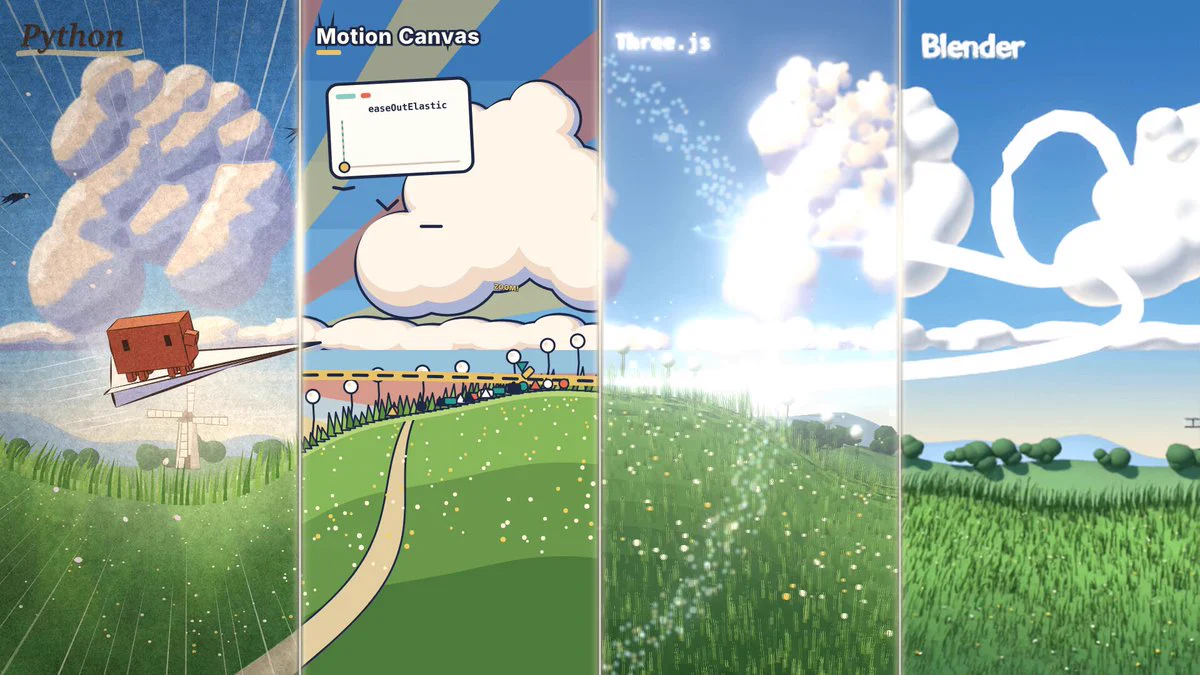
When using Anthropic’s conversational AI model Claude to generate videos, two creators starting with the same prompt can end up with vastly different results—one looking like a cinematic animated film and the other resembling a basic presentation slide. Creator Mimo (@aura_uniiiii) recently shared a side-by-side comparison illustrating how the choice of underlying production tools dramatically impacts the final visual outcome, proving that mastery goes beyond prompt engineering.
Image source: https://x.com/aura_uniiiii/status/2126107363191234774
This guide compares four common technical stacks and their distinct characteristics when translating Claude's powerful code generation and narrative-building capabilities into actual visual media, ranging from hand-drawn illustration styles to professional 3D rendering.
1. Python: Artistic Freedom for Hand-Drawn Styles and Data Visualization
Using Python—a general-purpose programming language widely used across various fields—provides immense stylistic freedom. It enables hand-drawn textures, artistic animation styles, mathematical demonstrations, and data visualization.
While it requires patience and fine-tuning of code parameters, it achieves a unique visual charm. It is an ideal choice when creators want programmatic control over distinctive artistic animations or dynamic data-driven visual assets.
2. Motion Canvas: Clean and Fluid Motion for Tutorials and Tech Explainers
Motion Canvas—a TypeScript-based framework for programmatic animations—delivers clean visuals and smooth transitions, making it ideal for knowledge sharing and technical tutorials. Similarly, tools like Remotion leverage React to efficiently generate template-based, batch-produced video content.
Because it allows precise control over object movement and timing through code, it stands out as one of the most effective tools for creating polished explanatory videos or programming education content that captures viewers' attention.
3. Three.js: Real-Time Web Rendering and Interactive 3D Scenes
Three.js—a JavaScript library that enables 3D graphics inside web browsers—excels at real-time rendering. It is tailored for interactive 3D environments and immersive visual experiences that users can navigate directly via web interfaces.
It is particularly useful when creators want browser-executable 3D results, adding interactive and exploratory elements that go beyond conventional flat video files.
4. Blender: Cinematic Lighting and Advanced 3D Modeling
Blender—an open-source 3D creation suite—offers comprehensive modeling and rendering capabilities. It is unmatched for cinematic lighting, sophisticated camera movements, and product showcases.
While it delivers the highest level of visual realism compared to the other options, creators must keep in mind that setting up complex 3D scenes and completing the rendering process requires the most time. It serves as the ultimate tool when professional cinematic quality is required.
Ultimately, unlocking Claude's full video generation potential requires pairing its advanced language and coding capabilities with the correct technical rendering pipeline suited to the content's goals.
Original source
- X (@aura_uniiiii): Original Claude Video Production Tool Guide